

Build a small business app in Python with SQLite
In this tutorial you build an invoicing app: customers, invoices with line items, calculated totals, document numbers and a Draft, Issued, Paid flow. It is about 40 lines of Python, runs as one process and stores everything in one SQLite file.
What you need
Python 3.12 or newer. Nothing else: no database server, no Node, no Docker.
1. Install Evlet and create a project
python3 -m venv .venv
source .venv/bin/activate
python -m pip install --upgrade evlet
evlet setup shop --app billing
cd shop
evlet setup creates a project folder with apps/ for code and instances/ for sites, and a starter app called billing. A project keeps its own virtual environment, and project commands use it automatically.
2. Write the models
Delete the starter file apps/billing/models/item.py and create apps/billing/models/invoice.py:
from evlet import Child, Currency, Date, Decimal, Link, Model, Rule, Sequence, State, Table, Text
from evlet.calc import F

STAFF = {"admin": Rule(("read", "create", "update", "delete")), "editor": Rule(("read", "create", "update"))}


class Customer(Model):
    permissions = STAFF
    title = Text(required=True, label="Name")
    city = Text(default="")


class Invoice(Model):
    permissions = STAFF

    class Line(Child):
        item = Text(required=True)
        qty = Decimal(scale=2, default=1)
        rate = Currency(currency="USD", default=0)
        amount = Currency(currency="USD", compute=F("qty") * F("rate"))

    number = Sequence("INV-{year}-{n:04}")
    customer = Link(Customer, required=True)
    issued_on = Date(required=True)
    lines = Table(Line)
    total = Currency(currency="USD", compute=lines.sum("amount"))
    docstate = State(
        State.Step("draft", "Draft"),
        State.Step("issued", "Issued", color="blue", release=True),
        State.Step("paid", "Paid", color="green", final=True),
        rules=(
            State.Rule("draft", "issued", "Issue", when=F("total") > 0),
            State.Rule("issued", "paid", "Mark paid", by=("admin",)),
        ),
        show="bar",
    )

    class Meta:
        title_field = "number"
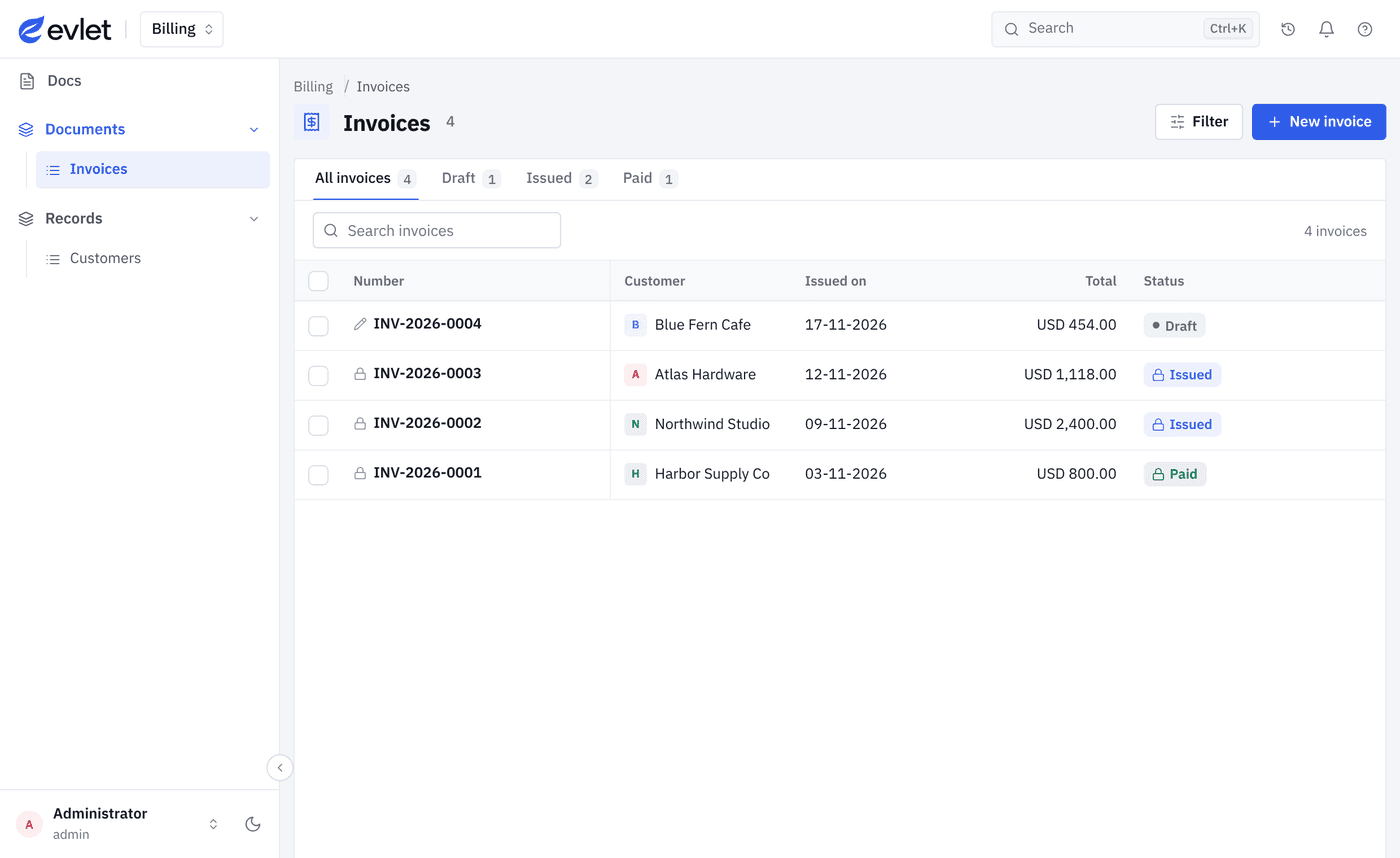
        list_fields = ("number", "customer", "issued_on", "total", "docstate")
A few things to notice:
- Permissions sit on the model. Admins can do everything, editors cannot delete. A role that is not listed gets nothing.
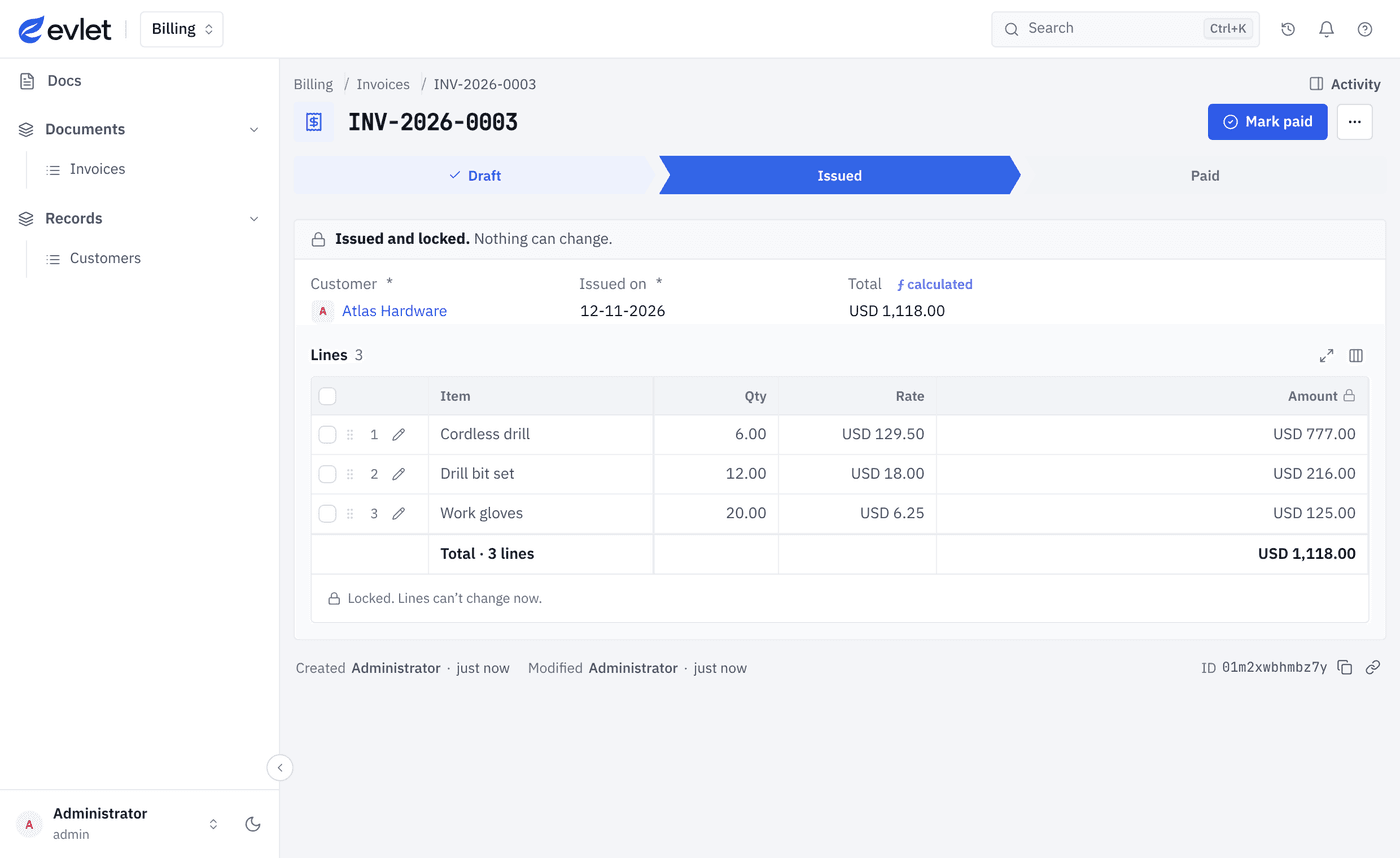
Lineis a child table. Its rows belong to one invoice and are saved with it.computeis exact.amountandtotaluse decimal math, in the browser while you type and again on the server when you save.Sequencenumbers the documents. Numbers such as INV-2026-0001 are assigned in the saving transaction and restart each year.Stateis the document's life. A draft can be issued only when its total is above zero. Issued is a released step, so the invoice is locked. Only an admin can mark it paid.
3. Create a site and install the app
evlet instance acme
evlet install billing --instance acme
evlet dev --instance acme
Evlet asks whether you trust the app before it runs its code. evlet dev starts the site on http://127.0.0.1:8000 and prints a one-time sign-in link. Open it and choose a password. On a new instance, administrators also set up two-step sign-in. You can relax both rules for local work in instances/acme/config.py.
4. Use it
Add a customer, then create an invoice and add lines. The amount and total update as you type. Click Issue and the invoice locks.
The list has a tab for each state, search and filters, without any list code.
5. Where the data lives
Everything for the site is in instances/acme/. The business data is one SQLite file, instances/acme/data/database.sqlite3, in WAL mode. Back up a site with one command:
evlet backup --instance acmeA second site with the same app is one more instance. It gets its own database, accounts and files.
6. Change the model later
While evlet dev runs, Python changes reload. When you add or change a database field, stop the server and run evlet migrate acme. Evlet backs up the database first and never alters tables silently at startup.
What you did not have to build
- Sign-in, roles and permission checks on every request
- Form and list screens, search and filters
- An HTTP API for the same models, with the same permissions
- A history of every change on every record
Is SQLite enough?
For a small or mid-size team, usually yes. SQLite handles many readers at once in WAL mode and serializes writes. Evlet's repository includes a benchmark with 2 million ledger rows and 50 concurrent readers that you can rerun. If you know you need PostgreSQL today, Evlet is not the right choice yet: PostgreSQL support is planned.
Evlet is pre-1.0. It is a good time to build and experiment, and too early to run a business on it.
Next steps
Last updated . Checked against Evlet 0.4.3.